
Pipo Wi-Fi Manager
You can access the wifi manager by clicking on the top right corner of the config page on the
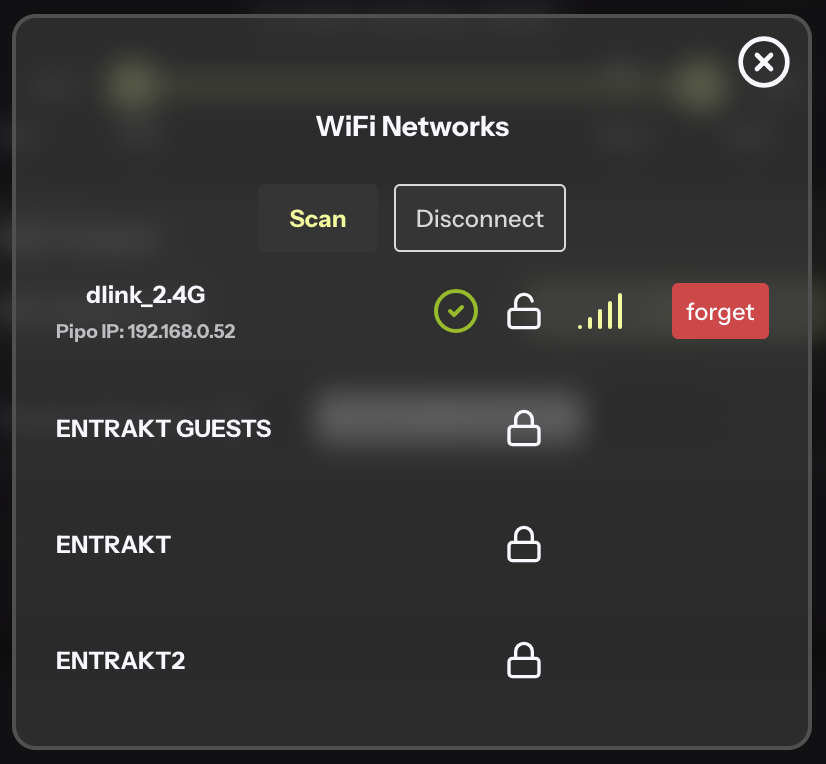
Pipo will initially scan the available networks around you.
Symbols:
When Pipo successfully connects to a network, it will remember the credentials, allowing to quickly connect in the future.
When Pipo starts, it will try to reconnect to the last connected network. If it fails, it will try the previous network with known credentials.
If you want to prevent Pipo to connect to a certain network, you can use the button forget so that the credentials of the networks get removed, and will prevent Pipo to connect to it.
Disconnect will only disconnect from the current connected network. To switch network, you should always disconnect first.