
Pipo Motion Quick Start Guide
By default, Pipo Motion is set in OSC (Wi-Fi) mode.
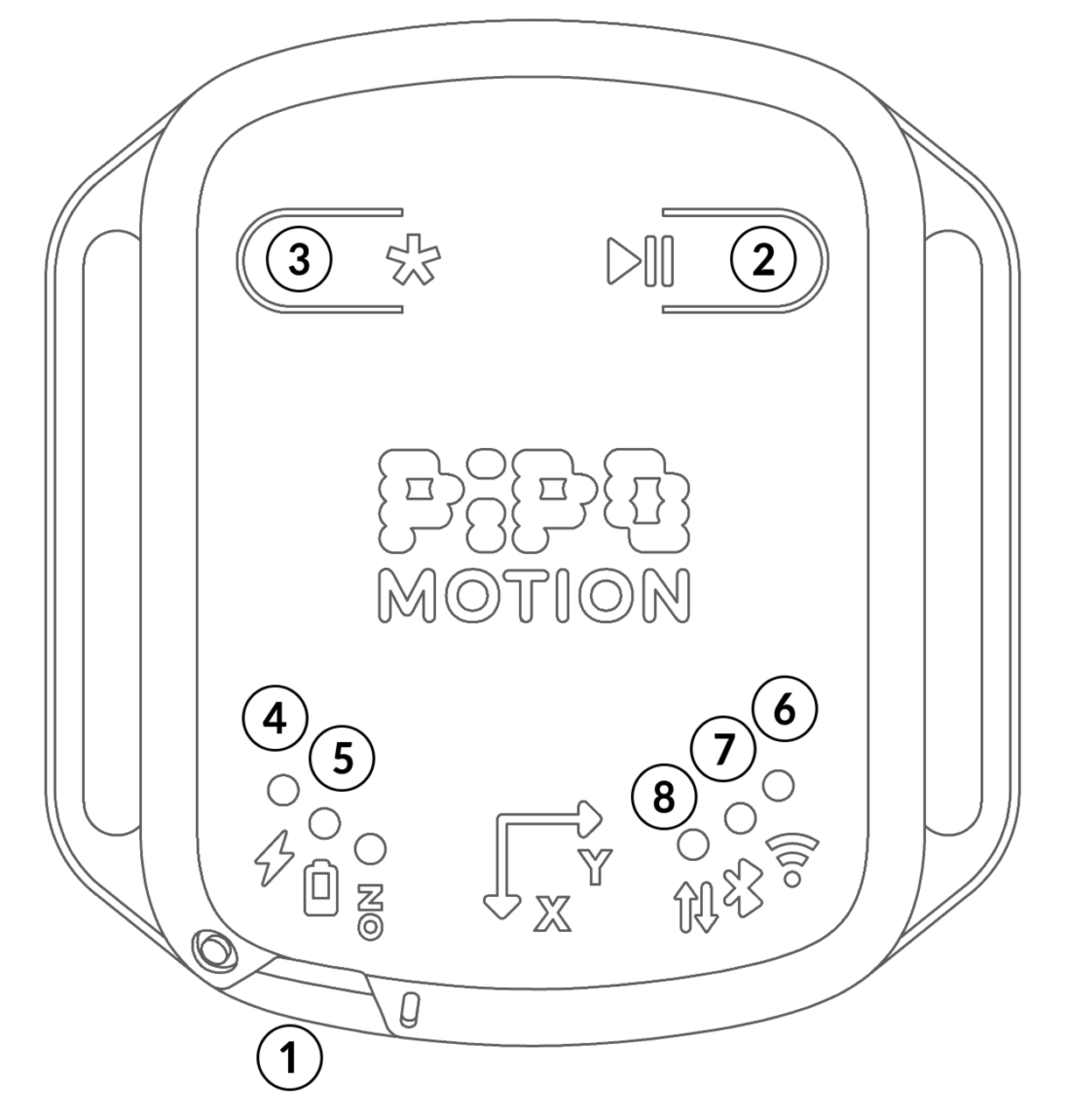
- ON/OFF slide switch
- Play/Pause button
- Function button
- Charging LED
- Low battery LED
- Wi-Fi LED
- Bluetooth LED
- Data LED
Sensor data
Euler angles: These 3 angles ("Yaw, Pitch, Roll") are one of the mathematical approach to describe the orientation of a rigid body with respect to a coordinate system. These are very convenient because they allow to get orientation through 3 intuitive rotations, but they also come with their intrinsic limitations, like being susceptible to the gimbal lock effect which can quickly become limiting depending on the targeted aplication. This way of capturing orientation is sufficent when small angular rotations are exectuted (or when capturing the exact spatial orientation is not the main target). For applications where robust 3D orientation is required, one should prefer to use quaternions (see below).
Euler angles are either measured in an absolute mode (orientation is given in the "Earth" coordinate system, using north and ground as reference), or can be relative, reporting the orientation from a chosen reference orientation (relative is turned on by default)
Gyroscope: The 3 Gyro axis measure the angular velocity around the 3 axis of the sensor.
Linear acceleration: This is the acceleration along each of the 3 sensor axis, corrected for the gravity acceleration.
Magnetometer: This report the magnetic field measured in the 3 axis of the sensor.
Quaternions This is a second mathematical approach to describe orientation. While it is less intuitive because it consist 4 abstract numbers, these are much more robust for 3D orientation. Alike Euler Angles, these can be reported as absolute or relative. However, because of their abstract nature, these cannot be translated to midi.
Changing Orientation Modes
- By default, Pipo Motion sensor is set into relative orientation mode (uses the last captured reference position as its zero)
- A short press on the function button resets the relative position reference orientation to capture a new reference position.
- A long press on the function button toggles the sensor to absolute orientation mode.